The short answer
If you only read one part of this page, read this list. Each line is the app that fits that way of budgeting best, based on the facts in the tables further down.
- You want to plan every dollar before you spend it, and you budget in one currency: YNAB.
- You want classic envelopes and a free plan to start: Goodbudget.
- You live in the US and want your bank accounts synced and categorised for you: Monarch, or Copilot if your household is all Apple.
- You follow the Ramsey baby steps and budget in US dollars: EveryDollar.
- You want a free tracker that handles several currencies and can sync banks outside the US: Wallet by BudgetBakers, or Spendee.
- You budget as a couple or family, want envelopes that follow your income, have accounts in more than one currency, and don't want to give an app your bank login: Kinjar (ours, in early access).
We make Kinjar, so weigh our entry accordingly. We have tried to put it where it fits and to say plainly where another app is the better choice. Every fact about the other apps comes from their own websites, linked at the bottom of this page.
How to choose a budget app in 5 minutes
A budget app that doesn't match how you think about money gets abandoned, however many features it has. Answer these five questions in order and you'll be down to one or two apps.
- Do you want to plan money before you spend it, or see where it went afterwards? Planning points to YNAB, EveryDollar, Goodbudget or Kinjar. Seeing where it went points to Monarch, Copilot, Wallet or Spendee.
- Will you connect your bank, or would you rather not? Bank sync saves typing, but coverage depends on your country: Copilot and EveryDollar Premium are US only, and Goodbudget's bank sync is for US banks only. If you prefer not to share bank logins, look for good file import or receipt scanning instead.
- Does anyone else spend from the same money? If yes, check how sharing works and what it costs. Some apps include a partner for free, some count devices, and one still lists partner invites as coming soon.
- Is all your money in one currency? If not, rule out the apps that only handle one currency per budget. That removes most of the US apps.
- Will you pay? Four of the apps here have a free tier. Most of the others have a trial, from 7 to 34 days. A spreadsheet is still a fine free option if you will keep it up.
Best budget apps compared
| App | Method | Price | Free option | Sharing | Currencies | Bank sync and import |
|---|---|---|---|---|---|---|
| YNAB | Plan every dollar before spending | $109/yr or $14.99/mo | 34-day trial, no card | Up to 6 people on one subscription | One per plan, no conversion | Bank import for select US, Canadian, UK and EU banks; CSV, QFX, OFX, QIF on web and iPad |
| Goodbudget | Envelopes | Premium $80/yr or $10/mo | Free plan: 20 envelopes, 1 account, 2 devices | By device: 2 free, 5 on Premium | One at a time | Bank sync for US banks (Premium); QFX, OFX, CSV on web |
| Monarch | Automatic tracking plus budgets | $99.99/yr or $14.99/mo | 7-day trial, payment method required | Partner free | Shows $ only, no conversion | 13,000+ institutions; CSV on web |
| EveryDollar | Zero-based | Premium $79.99/yr or $17.99/mo | Free version | Household feature for couples | US dollars only | Bank connect on Premium (needs a US debit card) |
| Copilot | Automatic tracking | $109/yr (limited-time price) | None listed | Partner invite listed as coming | USD only, US banks only | 16,000+ banks; full export |
| Wallet | Tracking plus budgets | Shown in the app only | Free tier for manual tracking | Group sharing on Premium | Several, with live rates | 15,000+ institutions; CSV, XLS, OFX |
| Spendee | Tracking plus budgets | Plus $14.99/yr, Premium $35.99/yr | Free Basic: 1 cash wallet, 1 budget | Shared wallets (Plus and Premium) | Several | Bank sync on Premium; import and export |
| Kinjar (ours) | Envelopes as % of income | €49/yr or €5.99/mo, founding €29 first year | 30-day trial, no card | Up to 5 members, invite code | 6, each account in its own, daily rates | No bank login: CSV or Excel statements from any bank, receipts read by AI |
How we compared them
We read each app's own pricing page, feature pages and help centre on 3 November 2026 and wrote down only what they say. We didn't use review sites for facts, ratings or user counts, and we don't quote any. Prices are what a visitor from the EU sees, in the currency the page shows. Where a page doesn't mention something, we say "not listed", which is not the same as "missing". Prices change often, so we re-check this page every month and update the date at the top.
We left out apps we couldn't check the same way, and banks' own budgeting tools, because they only see the money at that bank.
Best for envelope budgeting
Envelope budgeting splits your income into a few labelled pots before you spend it. If that's how you think, you want an app built around envelopes, not one that adds a budget screen on top of a transaction list. Our envelope budgeting guide explains the method with worked numbers.
Goodbudget: envelopes with a free plan
Goodbudget has been around since 2009 and is built entirely on envelopes. It's the easiest place to try the method without paying.
- Price: free plan with 10 regular and 10 more envelopes, 1 account, 2 devices and 1 year of history. Premium is $10 a month or $80 a year for unlimited envelopes and accounts, 5 devices and 7 years of history.
- Sharing: by device. A couple shares a budget by syncing their phones, 2 on the free plan and 5 on Premium.
- Currencies: one at a time. Goodbudget's help page says it can't tell denominations apart or convert between them.
- Import: QFX, OFX and CSV on the web. Automatic bank sync is on Premium and covers US banks only.
- Platforms: web, Android and iPhone.
- Drawback: the free plan's single account and one year of history are tight for a household. Outside the US you'll be importing files or typing.
Kinjar: envelopes as a share of income, for households (ours)
Kinjar is the app we make. Its budget is an envelope budget where each envelope is a percentage of the income that actually came in that month, so the targets follow your income when it changes. It was built for couples and families who share one ledger.
- Price: one Household plan, €49 a year or €5.99 a month. Founding members on the waitlist pay €29 for the first year. 30-day trial with every feature and no card. There is no free tier.
- Sharing: a partner joins with an invite code and sees the same ledger. Up to 5 members per household plan.
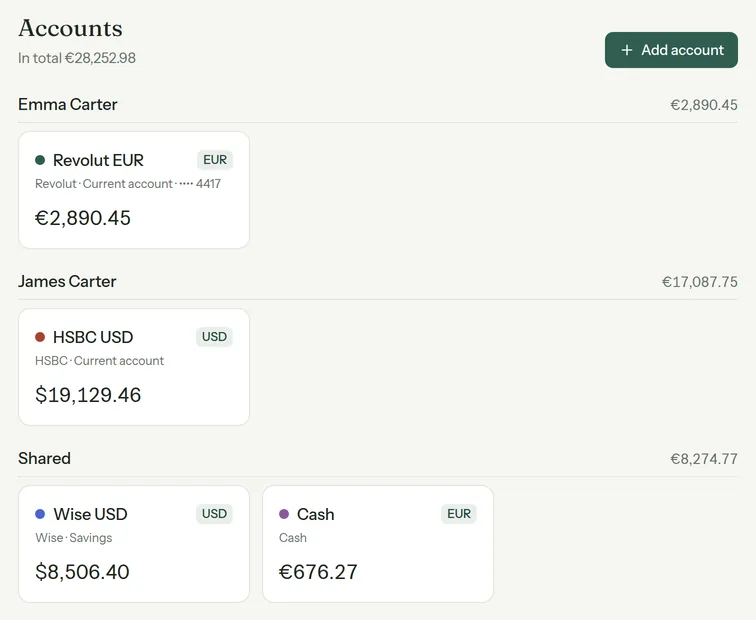
- Currencies: RON, MDL, USD, EUR, GBP and CHF. Each account keeps its own currency, rates update daily, and totals show in your base currency. Transfers between accounts can record the exchange and the fee.
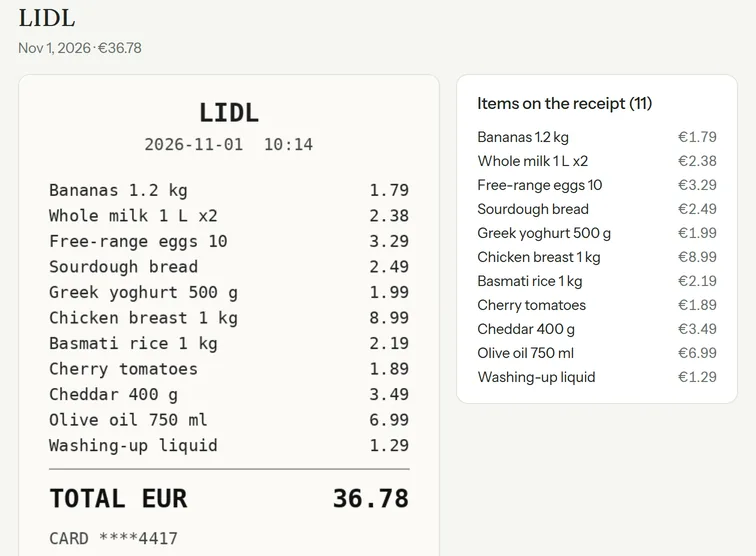
- Import: no bank login. You drop in CSV or Excel statements from any bank (the AI works out the layout), and receipt photos or PDFs are read by AI into merchant, date, total and line items.
- Platforms: web app that installs on Android and iPhone. English and Romanian.
- Drawback: no automatic bank sync, so you import a statement file now and then. It isn't open to everyone yet, and six currencies is fewer than Wallet or Spendee.
Budgeting as a couple or family? Join the Kinjar waitlist for early access and the founding price.Get early access
Best for zero-based budgeting (every dollar planned)
Zero-based budgeting gives every unit of income a job until nothing is left unassigned. It's close to envelopes, with more categories and more month-to-month decisions.
YNAB: the most complete planner, one currency per plan
YNAB asks you to make a plan for what your money should do before spending any of it. It's the strongest option here if you want to plan in detail and you're willing to learn its method.
- Price: $109 a year or $14.99 a month, plus tax. 34-day free trial with no card when you sign up directly. Students get a free 365-day trial.
- Sharing: up to six people on one subscription.
- Currencies: one per plan. YNAB's help centre suggests a separate plan for each currency and says it doesn't convert within a plan.
- Import: direct import for select US, Canadian, UK and EU banks. File import of CSV, QFX, OFX and QIF works on the web app and iPad, not on iPhone or Android.
- Platforms: web, iPhone, Android, iPad and Apple Watch, plus a public API.
- Drawback: if your household earns or spends in two currencies, you end up with two plans that don't add up to one picture.
EveryDollar: zero-based, for US households
EveryDollar is the Ramsey budgeting app, built around zero-based budgets and the debt snowball. If you follow Ramsey's plan and live in the US, it's the natural pick.
- Price: a free version, and Premium at $79.99 a year or $17.99 a month after a free trial.
- Sharing: a household feature lets a couple manage one budget with separate logins.
- Currencies: US dollars only. Its help centre warns that other currencies will likely cause calculation errors.
- Import: bank connect on Premium. Premium can't be bought outside the US because it needs an American debit card.
- Platforms: computer, phone and tablet.
- Drawback: outside the US you're limited to the free version, in dollars.
Best for automatic tracking with bank sync
These apps connect to your bank accounts, pull in transactions and categorise them. You budget less up front and review more afterwards. They work best where their bank coverage is strongest, which for both apps here is the US.
Monarch: the full picture for US couples
- Price: Core at $99.99 a year or $14.99 a month. 7-day free trial, payment method required, with a money-back guarantee.
- Sharing: add a partner for free, plus read-only access for a financial professional.
- Currencies: everything shows as $. Monarch's help centre says it doesn't convert currencies and recommends only USD or CAD accounts.
- Import: connects to 13,000+ institutions. CSV import on the web only. It scans and itemises receipts, and has an AI assistant.
- Platforms: web, iOS, Android and iPad.
- Drawback: a poor fit if any of your accounts are in euros, pounds or another currency.
Copilot: polished tracking for Apple users in the US
- Price: one plan, $109 billed yearly, shown as a limited-time price instead of $119.
- Sharing: partner invites are listed as coming soon.
- Currencies: USD only. Copilot supports US financial institutions only and is only in the US App Store.
- Import: 16,000+ banks through Plaid and Mastercard. Full transaction export from Settings.
- Platforms: iPhone, iPad, Mac and web. No Android app is listed.
- Drawback: not for couples yet, not for anyone outside the US, and not for an Android user.
Best for money in several currencies
This is where most best-of lists go quiet, because most of the apps they rank handle one currency. If you're paid in euros and pay a loan in another currency, or keep savings in dollars, look at Wallet, Spendee or Kinjar.
Wallet by BudgetBakers
- Price: free tier for manual tracking. Premium is monthly, yearly or lifetime, with prices shown only inside the app.
- Currencies: full multi-currency support with exchange rates calculated automatically.
- Import: open-banking sync with over 15,000 institutions worldwide, and CSV, XLS or OFX files for history.
- Sharing: group sharing on Premium, where you choose which accounts to share.
- Platforms: iOS, Android and web. Wallet says some features differ slightly between them.
- Drawback: you can't compare its price before installing, and it's a tracker with budgets more than an envelope planner.
Spendee
- Price: Basic is free with 1 cash wallet and 1 budget. Plus is $14.99 a year and Premium $35.99 a year, with a 7-day trial. Spendee says local prices may differ.
- Currencies: multiple currencies, aimed at travellers.
- Import: bank sync on Premium, import and export of transactions, and an AI receipt scanner.
- Sharing: shared wallets with a partner, family or roommates on Plus and Premium.
- Platforms: iOS, Android and web, but budgets are on iOS and Android only for now.
- Drawback: if you plan on a laptop, budgets aren't on the web yet.
Kinjar sits in this group too: each account keeps its own currency, rates update daily, and the household total shows in one base currency. The difference is the method. Wallet and Spendee start from tracking; Kinjar starts from an envelope plan.
Best budget apps for couples and families
Sharing decides more than features do. If only one partner can see or edit the budget, the other one is guessing. Here is how each app handles a second person:
| App | How a partner joins | Extra cost | Platforms |
|---|---|---|---|
| YNAB | Shared subscription, up to 6 people | None | Web, iPhone, Android, iPad, Apple Watch |
| Goodbudget | Sync on another device | None, within the device limit (2 free, 5 Premium) | Web, Android, iPhone |
| Monarch | Add a partner | Free | Web, iOS, Android, iPad |
| EveryDollar | Household feature, separate logins | Not listed | Computer, phone, tablet |
| Copilot | Listed as coming | Not listed | iPhone, iPad, Mac, web |
| Wallet | Group sharing, chosen accounts | Premium | iOS, Android, web |
| Spendee | Shared wallets | Plus or Premium | iOS, Android, web |
| Kinjar | Invite code, same ledger | None, up to 5 members | Web app, installs on Android and iPhone |
For a couple in the US who want everything synced, Monarch or YNAB are the safe choices. For a couple who budget with envelopes, or whose money isn't all in dollars, Kinjar was built for exactly that case. Whatever you choose, a ten-minute check together each week matters more than the app.
Best if you'd rather not connect your bank
Bank sync means a data aggregator holds a connection to your accounts. Many people are fine with that. Some aren't, and some banks simply aren't covered. Without a bank connection you have three ways to get transactions in:
- Type them. Goodbudget, Wallet's free tier and Spendee Basic all work this way, and it keeps you close to every purchase.
- Import statement files. YNAB, Goodbudget, Monarch and Wallet accept files, mostly on the web. Kinjar reads CSV or Excel statements from any bank and detects the layout with AI, with rules (LIDL to Groceries, for example), duplicate checks and a review screen before saving.
- Scan receipts. Monarch, Spendee and Kinjar read receipts. In Kinjar the AI pulls the merchant, date, total and every line item and keeps the photo attached.
On data: YNAB, Goodbudget, Monarch, Copilot and Wallet all say on their sites that they don't sell your financial data, and Monarch and Copilot say they show no ads. Kinjar has no ads, doesn't sell data, and lets you export everything as CSV. The features page shows how import and receipts work.
The best free budget apps
Four apps in this comparison have a free tier you can keep using, each with clear limits:
- Goodbudget: 20 envelopes, 1 account, 2 devices, 1 year of history. The best free option for envelopes.
- Wallet: free manual tracking, with several currencies.
- Spendee Basic: 1 cash wallet and 1 budget. Fine for one person tracking cash.
- EveryDollar: a free version in US dollars.
YNAB (34 days, no card), Monarch (7 days, card required) and Kinjar (30 days, no card) have trials but no free plan, and Copilot lists no free option. Kinjar has no free tier on purpose: one paid plan pays for the AI that reads your receipts and statements, and you can still export your data after a trial ends. Prices are on the pricing page.
If you don't want to pay anything, a spreadsheet works for budgeting by hand. The tradeoff is the same as always: you type everything, and sharing it with a partner on a phone is clumsy.
Which budget app is best for you
- Best overall for detailed planning in one currency: YNAB.
- Best free envelope app: Goodbudget.
- Best automatic tracker for US couples: Monarch.
- Best for Ramsey followers in the US: EveryDollar.
- Best free tracker with several currencies: Wallet.
- Best for a shared household budget with envelopes, several currencies and no bank login: Kinjar, once you're in from the waitlist.
Try one app for a full month before you judge it. The first two weeks are always the worst, because you're still setting up categories and fixing guesses.
Facts about other apps checked on their websites on 3 November 2026.