
We make Kinjar. Every fact about the other apps below comes from their own pricing, product or help pages or their app store listing, read on 3 November 2026 and listed under the sources. Prices change, so check the app's page before you pay.
What a couple needs from a shared budget app
A budget app for one person only has to be useful to its owner. A couples budget app has a harder job: two people with different habits, often different banks, sometimes different currencies, have to trust the same numbers. Before comparing features, check these:
- Two logins on one budget. Each of you signs in as yourself and sees the same plan. Sharing one password works until one of you changes it.
- Both of you can add spending in seconds. If only one partner records purchases, the other stops trusting the numbers within a month.
- Room for mine, yours and ours. Most couples keep some money separate. The app should show personal and shared accounts side by side without forcing you to merge everything.
- A plan, not only a history. Tracking tells you where money went. A budget says where it's going. Look for envelopes or categories with targets.
- The currencies you actually earn and spend in. If one of you is paid in another currency, check what the app does with it before you import a single transaction.
- A way in for your banks. Bank sync is often limited to certain countries. File import (CSV, Excel, OFX) or receipt scanning works with any bank.
- One price for the household, and your data back when you leave (export).
Budget apps for couples compared
| App | Price | Partner sharing | Currencies | Getting transactions in | Platforms |
|---|---|---|---|---|---|
| YNAB | $109/yr or $14.99/mo; 34-day trial | Up to 6 people on one subscription | One currency per plan, no conversion inside a plan | Bank import for select US, Canadian, UK and EU banks; CSV, OFX, QFX, QIF files on web or iPad | Web, iPhone, Android, iPad, Apple Watch |
| Monarch | Core $99.99/yr or $14.99/mo; 7-day trial, card required | Partner added for free | Everything shown in $, no conversion; USD or CAD accounts recommended | Sync with 13,000+ institutions; CSV import on web only | Web, mobile, iPad |
| Goodbudget | Free plan (10 + 10 envelopes, 1 account, 2 devices); Premium $80/yr or $10/mo | Shared by device: 2 free, 5 on Premium | One currency at a time, no conversion | Bank sync for US banks only (Premium); QFX, OFX, CSV on web | Web, Android, iPhone |
| EveryDollar | Free version; Premium $79.99/yr or $17.99/mo | Household feature, separate emails | US dollars only | Bank connect on Premium, which needs an American debit card | Computer, phone, tablet |
| Spendee | Free Basic; Plus $14.99/yr; Premium $35.99/yr | Shared wallets on Plus and Premium | Multiple currencies | Bank sync on Premium; import and export; AI receipt scanner | iOS, Android, web (budgets not on web yet) |
| Wallet by BudgetBakers | Free tier; Premium price shown only in the app | Group Sharing on Premium, you pick the accounts | Multi-currency with live exchange rates | Open banking with 15,000+ institutions; CSV, XLS, OFX import | iOS, Android, web |
| Copilot Money | $109/yr | Partner invites listed as coming this fall | USD only, US institutions only | Sync with 16,000+ banks | iPhone, iPad, Mac, web |
| Kinjar (ours) | €49/yr or €5.99/mo; €29 first year for founding members; waitlist now | Up to 5 members, partner joins with an invite code | Six currencies, daily rates, totals in your base currency | No bank login: statements as CSV or Excel from any bank, receipt photos and PDFs read by AI | Web app you install on Android or iPhone |
Honeydue shows up in most lists of couples apps. It's built only for couples and its homepage says you "choose what you want to share". We couldn't read its pricing or currency details on its own pages, so it isn't in the table.
Where each app is the better choice
- YNAB, if you want a well defined budgeting method and you live where its bank import works. One subscription covers up to six people, and it runs on web, phones, iPad and even Apple Watch. Couples paid in two currencies have to keep a separate plan per currency.
- Monarch, if you're in the US or Canada and want everything synced automatically. Adding a partner costs nothing extra. Its own help centre says it doesn't convert currencies and has no plans to expand currency support soon.
- Goodbudget, if you want envelopes and a free start. The free plan works for a couple sharing one account on two phones. Bank sync is US only, so most people outside the US will import files or type entries.
- EveryDollar, if you follow the Ramsey method and live in the US. The household feature is made for couples. It only supports dollars, and Premium needs an American debit card.
- Spendee, if price matters most and you need more than one currency. Shared wallets are on the paid plans, and Plus is the lowest yearly price of any paid plan with a published price in the table.
- Wallet, if you want bank sync outside the US and multi-currency in the same app. Group Sharing lets each partner choose which accounts the other sees.
- Copilot, only if you're both in the US (it's on iPhone, iPad, Mac and web). Partner sharing wasn't live when we checked.
And Kinjar, where we're honestly weaker: there's no bank sync, so you drop in statement files or snap receipts instead of connecting your bank. There's no free plan. It's a web app you install from the browser, not a store app. And it isn't open to everyone yet: you join the waitlist and get in during early access. What it does differently is the plan itself: envelopes sized as a percentage of the month's real income, one ledger for the whole household, and accounts in different currencies added up in one base currency.
Want to try Kinjar as a couple? Join the waitlist and get the founding price of €29 for the first year.Get early access
A worked example: how Emma and James share costs
Emma and James Carter live in the eurozone. Emma earns €2,800 a month net into Revolut. James earns about €2,400 a month, paid in US dollars into an HSBC account. They also share a Wise savings account in dollars and some cash. Their shared monthly costs come to €2,800:
| Cost | Per month |
|---|---|
| Rent | €1,450 |
| Utilities and internet | €250 |
| Groceries | €650 |
| Car loan | €420 |
| Streaming subscriptions | €30 |
| Total | €2,800 |
Couples usually pick one of three ways to cover costs like these. Here is what each means for the Carters:
| Method | Emma pays | James pays | Left for Emma | Left for James |
|---|---|---|---|---|
| 50/50 | €1,400 | €1,400 | €1,400 | €1,000 |
| In proportion to income (54% / 46%) | €1,507.69 | €1,292.31 | €1,292.31 | €1,107.69 |
| All in one pot | Whole salary into the pot | Whole salary into the pot | €2,400 left, shared | €2,400 left, shared |
None of these is the right answer for everyone. The Carters chose the proportional split because a 50/50 split left James with €400 less than Emma every month. Whatever you choose, write it down in the app as the plan, so the conversation happens once and not at every supermarket checkout.
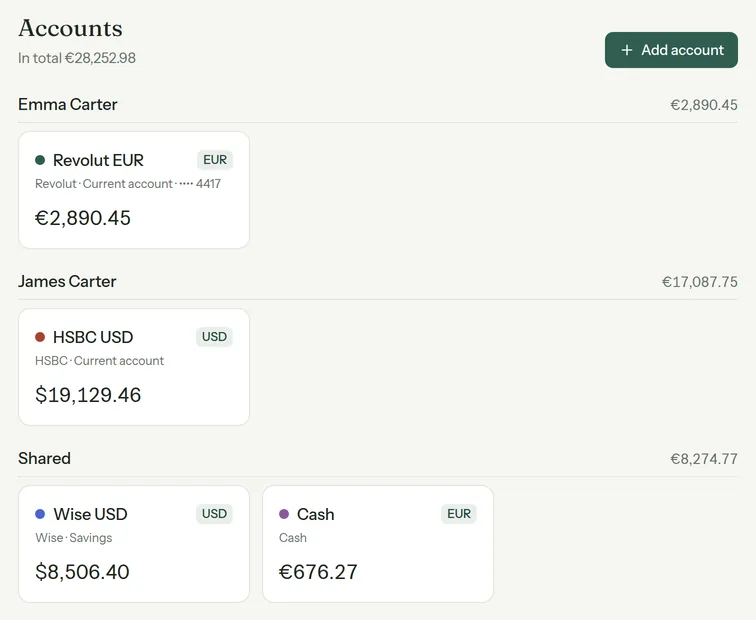
In Kinjar, their Accounts page groups the money into Emma's accounts, James's accounts and shared ones, each in its own currency, with the total in euros at the day's rate. Kinjar is a shared budget, not a bill splitter: it doesn't calculate who owes whom. If you mostly need to settle up after trips and dinners, a splitting app does that job better.
Once the split is settled, the budget itself can be a handful of envelopes, each a share of the €5,200 coming in. The envelope budgeting guide walks through the Carters' envelopes and what happens when a month brings in less.
How to set up a couples budget app in your first week
- Day 1: talk for half an hour, without the app. Agree on how you split shared costs (one of the three methods above) and how much each of you can spend without asking.
- Day 2: one of you creates the household and invites the other. Add every account either of you uses, including cash and savings, and mark which ones are shared.
- Day 3: bring in last month. Import a statement file from each bank, or connect the banks if your app supports yours. Fix categories on the review screen while the month is fresh in your heads.
- Day 4: set up four to six envelopes or categories with targets that add up to your income. Start broad; you can split them later.
- Day 5: add the recurring payments (rent, loan, subscriptions) so you can see what's still due this month.
- Day 6: agree who records what. A simple rule works: whoever pays snaps the receipt or adds the expense the same day.
- Day 7: your first weekly check, ten minutes together. What's left in each envelope, anything big coming up, any money to move.
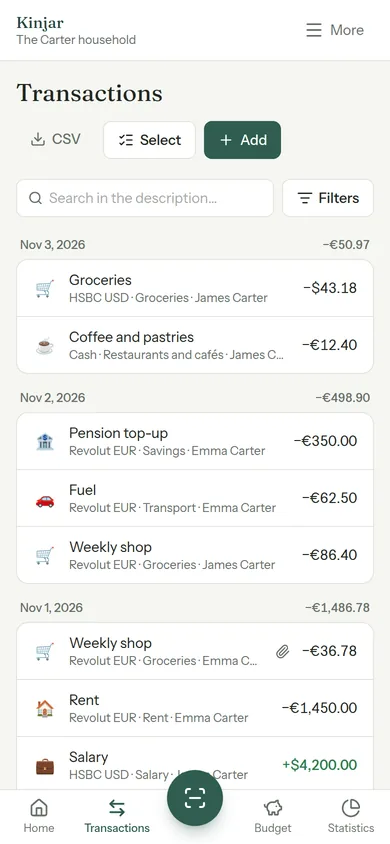
The features page shows how receipts, statement import and the shared ledger work in Kinjar, and the pricing page has the household plan and the founding price.
Facts about other apps checked on their websites on 3 November 2026.